
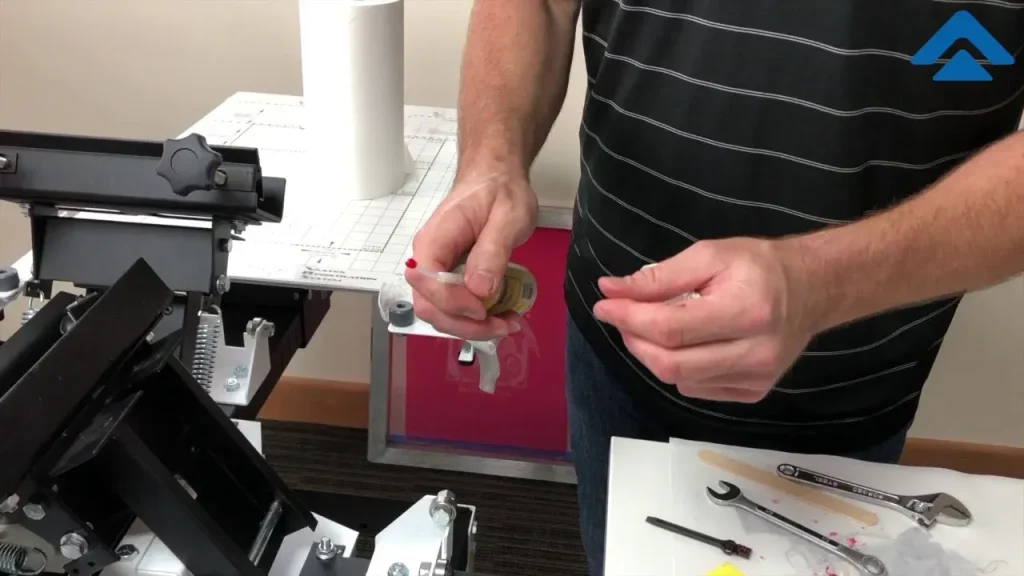
Screen printing equipment maintenance is the bedrock of a reliable, high-quality screen printing operation. By focusing on proactive routines—cleaning, reclaiming screens, and protecting components—you minimize downtime, extend the life of screens and frames, and maintain consistent print results. A well-structured approach to maintenance, including screen cleaning tips, regular reclaiming, and a clearly defined maintenance schedule for screen printing, translates into fewer surprises on press and more predictable productivity. Investing in routine checks helps spot wear before it becomes a fault, optimizes ink yield, and preserves assets like squeegees, exposure units, and frames for longer lifespans. Whether you run small runs or high-volume production, adopting a longevity-minded mindset around extending screen life is essential to sustaining quality and profitability.
Think of it as equipment care and workflow protection rather than a one-off fix. Regular upkeep spans mesh tension checks, frame alignment, and solvent-safe cleaning routines that prevent residue build-up and rust on moving parts. A strong preventive plan centers on documented checks, scheduled inspections, and the ongoing renewal of worn components—concepts that map to the idea of organized shop maintenance for screen-based production even when described in different terms. By framing the practice around screen integrity, rejuvenating screens, and tool longevity, shop teams can connect daily tasks to longer-lasting performance and steadier output.
Screen printing equipment maintenance: foundations for consistent production
Proactive screen printing equipment maintenance lays the groundwork for a predictable, reliable production line. By prioritizing regular checks, cleaning routines, and component wear monitoring, shops reduce downtime and sustain print quality across runs. A well-executed maintenance mindset helps protect investments in presses, screens, frames, and exposure units, ensuring that you can meet color accuracy and registration targets even during peak seasons.
In practice, this means building a simple, repeatable plan that covers daily cleaning, periodic inspection, and longer-term upkeep like mesh tension verification and stencil reapplication. Emphasizing maintenance schedules for screen printing not only minimizes expensive surprises but also extends the life of key assets, contributing to steadier ink yields, fewer misprints, and a steadier workflow.
Daily and weekly screen cleaning: tips and best practices
A robust discipline around screen cleaning tips keeps mesh openings open and image fidelity high. After each job, wipe down the press, flood bars, and squeegees to remove ink residues and solvent traces that can corrode metal parts. Rinsing screens with lukewarm water before the emulsion dries helps maintain mesh clarity and prevents ghosting in subsequent runs.
Implement a weekly deep-clean routine that targets stubborn residues and checks frame integrity. Soak screens in a mild cleaner or approved degreaser, then scrub non-abrasively to preserve mesh yarns. Regularly inspect corners and tie-ins for rust or looseness, tightening fasteners as needed and following manufacturer guidance for lubrication and calibration to uphold consistent print results.
Reclaiming screens effectively to restore print fidelity
Reclaiming screens is a practical technique to restore mesh openness and ensure clean ink passage when the stencil wears out. When ghosting or poor ink transfer appears, or when emulsion buildup becomes difficult to remove with routine cleaning, reclaiming can refresh the stencil and adapt to new colors or artwork without sacrificing print quality.
A systematic reclaiming process includes removing residual ink, stripping the old stencil and emulsion with manufacturer-approved solvents, soaking, scrubbing gently, and thoroughly rinsing. After drying, re-stretch the mesh if needed and test with a sample print to verify consistency. Prioritize safety by working in well-ventilated spaces and using appropriate gloves and eye protection when handling reclaiming chemicals.
Maintenance schedule for screen printing: building a practical routine
A practical maintenance schedule for screen printing keeps teams aligned and reduces unplanned downtime. A 12-week plan—covering daily tactile checks, weekly deep cleans, monthly reclamation reviews, and quarterly safety and calibration audits—provides a scalable framework suitable for small shops or larger plants. Documenting each task helps your team track wear patterns and extend the life of screens, frames, and exposure units.
Tailor the cadence to your equipment and workflow, but ensure you include steps to verify mesh tension, inspect fasteners, calibrate exposure times, and review safety data sheets for cleaners and solvents. A clear maintenance schedule for screen printing also supports training, making it easier to onboard new operators and maintain consistency across shifts.
Extending screen life through proper storage, mesh care, and frame maintenance
Extending screen life starts with thoughtful storage and careful handling between runs. Keep screens clean and completely dry to prevent mold, corrosion, and mesh distortion. Store frames flat or upright in a way that avoids bending and ensure they are in a ventilated area to minimize moisture and chemical exposure that can degrade the mesh or finishes.
Regular mesh and frame maintenance further protects longevity. Inspect mesh for pinholes or thinning, tighten frame bolts, and maintain square corners to prevent misalignment during runs. Gentle lubrication on moving parts, as recommended by the manufacturer, helps minimize rust and wear, while a coordinated preventive-care routine reduces unexpected downtime and preserves print quality over seasons.
Tools, safety, and documentation that support long-term reliability
A well-equipped shop with the right tools—screen cleaners, reclaiming solutions compatible with your stencil system, soft brushes, lint-free cloths, mesh stretching tools, and tension meters—makes maintenance feasible and repeatable. Don’t overlook PPE such as gloves, goggles, and masks when handling solvents, along with proper ventilation to protect staff during routine upkeep.
Beyond tools, robust documentation and training underpin long-term reliability. Maintain a digital or physical maintenance log that records cleaning, reclaiming, tension checks, and part replacements. Regular briefings or refresher trainings help operators recognize early warning signs—unusual noises, misprints, or unusual ink consumption—so issues are addressed before they escalate.
Frequently Asked Questions
Why is screen printing equipment maintenance important for your operation?
Regular screen printing equipment maintenance is essential to prevent ink buildup, protect mesh tension, and reduce costly downtime while preserving print quality. By implementing consistent routines for cleaning, reclaiming, and inspecting components, you extend screen life and safeguard investments in screens, frames, squeegees, and exposure units.
What are the key screen cleaning tips I should follow for daily maintenance?
These screen cleaning tips form the daily maintenance foundation: wipe the press, pallet, and flood bars after each job; rinse screens with lukewarm water to remove excess ink; clean squeegees with mild soap and water and dry thoroughly to prevent rust.
When should you reclaim screens, and how do you reclaim them effectively?
Reclaiming screens becomes necessary when ghosting, poor ink transfer, or stubborn emulsion buildup reduces stencil clarity. Steps: remove residual ink, strip or remove the stencil and emulsion using the recommended solvent, soak in reclaiming solution, scrub gently with a soft brush, rinse thoroughly, dry, re-stretch if needed, apply a fresh stencil, and run a test print.
How can I implement a practical maintenance schedule for screen printing?
Adopt a practical maintenance schedule for screen printing that covers daily, weekly, monthly, and quarterly tasks: Daily—wipe and inspect the press and squeegees, rinse screens after use; Weekly—deep clean screens and check mesh tension, clean exposure unit surfaces; Monthly—reclaim screens showing wear and calibrate exposure times; Quarterly—replace worn parts, review safety and storage, and verify overall alignment.
What practices help extend screen life through proper care?
Extending screen life comes from proactive care: keep screens clean and dry, store them properly to avoid bending the frames, monitor mesh for wear, re-stretch when needed, and follow manufacturer-recommended cleaners to minimize chemical damage.
What common maintenance mistakes should I avoid in screen printing?
Avoid common pitfalls like over-cleaning with harsh solvents, failing to dry screens before storage, ignoring signs of wear or misalignment, and cramped storage that stresses frames. Also skip maintaining a workflow log or skipping routine checks, which can lead to unexpected downtime.
| Topic | Key Points | Practical Tips |
|---|---|---|
| Why maintenance matters | Screen printing is high-use and high-precision; relies on mesh tension, clean screens, and functioning presses. Neglect leads to ink buildup, rust, and degraded print quality. Regular maintenance helps detect wear early, optimizes ink yields, extends asset life, reduces downtime, and protects essential components. | Establish a maintenance mindset; schedule regular checks; maintain a log; train staff to recognize wear signs. |
| Cleaning routines | A robust cleaning routine shields components from ink residue, solvents, and emulsion buildup, preserving mesh performance and image fidelity. | Daily: wipe press/pallet/flood bars after each job; rinse screens; clean squeegees. Weekly: soak screens, inspect frames for rust, apply light lubrication per manufacturer guidance. Monthly/Quarterly: re-check mesh tension, review SDS for cleaners, calibrate exposure settings. |
| Reclaiming screens | Reclaiming restores mesh openness and ink passage, removing old emulsions when stencil life wears out. | When to reclaim: ghosting/poor transfer; difficult emulsion buildup; new colorways require fresh stencil. Steps: remove residual ink; remove stencil/emulsion; soak and scrub; rinse; dry and inspect; restretch if needed; cure and test. Safety: work in ventilated area; wear gloves/eye protection; store chemicals per guidelines. |
| Extending longevity | Protecting assets between runs and across seasons reinforces long-term value and reduces early replacements. | Storage: keep screens clean and dry; store flat or vertically to avoid bending. Use moisture control. Mesh/frame maintenance: inspect for pinholes; tighten bolts; apply light lubrication as recommended. Preventive care: maintain a maintenance log; schedule routine downtime; train staff to spot early warning signs. |
| Maintenance schedule | A practical 12-week plan guiding Daily/Weekly/Monthly/Quarterly activities. | Daily: wipe/inspect press, flood bars, squeegees; rinse screens after use. Weekly: deep clean, check/tighten mesh tension; clean exposure unit. Monthly/Quarterly: reclaim screens; inspect fasteners; calibrate exposure times; log progress. |
| Common mistakes | Over-cleaning or using harsh solvents; not drying screens; ignoring misalignments or unusual noises; storing screens in cramped spaces. | Use manufacturer-approved cleaners; dry screens completely before storage; address signs early; store screens with proper support and ventilation. |
| Tools and supplies | Detergents, reclaiming solutions, brushes, lint-free cloths, mesh-stretching tools, PPE, and documentation tools. | Keep a stocked maintenance kit; match cleaners to emulsions; use a maintenance log template/digital checklist. |
Summary
Conclusion: Screen printing equipment maintenance is not a one-and-done task; it is an ongoing discipline that underpins print quality, operational efficiency, and the value of your tools and materials. By committing to regular cleaning routines, timely reclaiming, and a longevity-focused maintenance plan, you protect your investment, reduce downtime, and ensure your shop can produce consistent, high-quality results for years to come. Embrace a proactive maintenance mindset—document, inspect, and iterate—and your team will benefit from fewer disruptions, longer-lasting screens, and a smoother, more profitable workflow.