
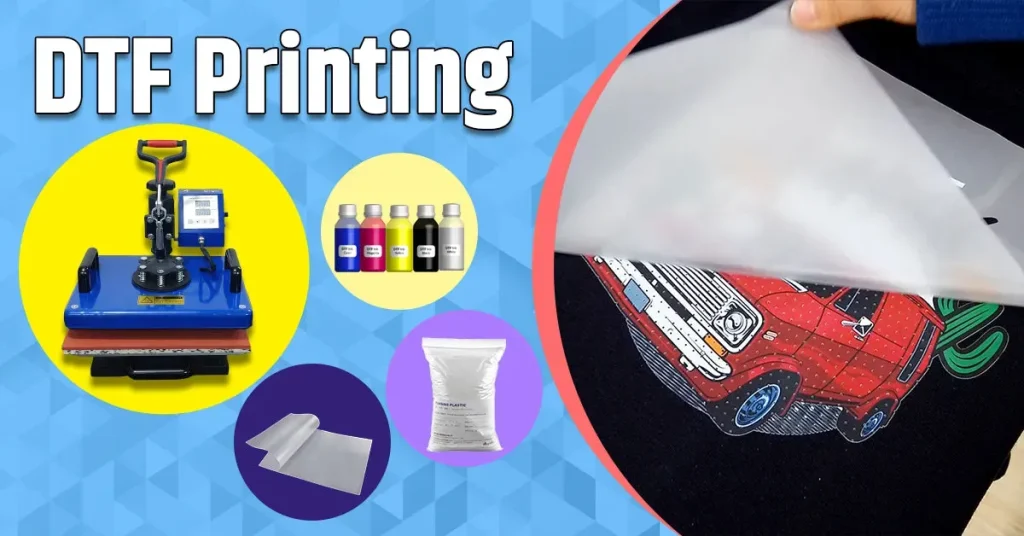
DTF Artwork Preparation is the foundation of successful direct-to-film printing. Starting with solid preparation improves color accuracy, print durability, and the overall look of the finished garment. This guide walks you through the process from concept and file setup to the final transfer on fabric, highlighting essential DTF printing tips and best practices for DTF file preparation. Whether you run a small shop or a dedicated DTF studio, optimizing each step saves time, reduces waste, and increases customer satisfaction. Adhering to DTF transfer guidelines ensures consistency across batches and supports reliable color management and print quality.
Think of it as a careful pre-creation workflow for film-based transfers, where every asset is readied for production. Alternative terms emphasize the same idea: pre-press for DTF, digital-to-film artwork prep, or the print-ready design stage tailored for different substrates. LSI-friendly framing covers color management, file organization, and separations, since these concerns recur across related topics like DTF transfer process and DTF artwork design guidelines. A strong emphasis on quality control, scalable SOPs, and consistent RIP settings helps teams deliver reliable results in high-volume workflows.
DTF Artwork Preparation: From Concept to Clean File
DTF Artwork Preparation starts at concept: align your design with the chosen substrate, ink behavior, and heat transfer dynamics. By applying DTF printing tips, you set up color management, monitor calibration, and a workflow that yields a print-ready file before you touch a press. A solid concept minimizes revisions and accelerates production, especially in high-volume environments.
Move into the specifics of DTF file preparation and design execution. Map out layer structure, set up separations with underbase considerations for light fabrics, and extend artwork into safe bleed zones. Following DTF artwork design guidelines helps ensure the final transfer matches the creative vision and reduces reprints, while keeping post-processing predictable and efficient.
DTF File Preparation: Practical Steps for Reliable Output
The file prep stage focuses on formats, resolution, and layers. Use TIFF or PNG with transparency when needed, maintain a layered native file for edits, and work at 300-600 DPI at the target size. DTF file preparation ensures the printer receives a faithful, scalable asset and minimizes surprises during rip.
Color profiles must be consistent; manage bleed, trim, and registration marks; name layers clearly. Adhering to a thoughtful file preparation workflow helps prevent color shifts and misprints, and you can tie these steps back to DTF transfer guidelines to keep registration precise.
Design Considerations for DTF Artwork
Design decisions set the stage for reliable transfers. Emphasize color management, proper resolution (typically 300-600 DPI at final size), and smart layering so each shade sits on its own vector or raster element. DTF artwork design guidelines advise keeping gradients smooth and ensuring separations are clean to minimize banding and ghosting, while DTF printing tips help you predict ink behavior on your chosen fabric.
Substrate awareness is essential: consider fabric type, fiber content, and post-wash expectations. Bleed and safe zones should be built into every file, and artwork should remain legible after transfer. These practices align with DTF artwork design guidelines and reinforce predictable outcomes across different materials.
Understanding the DTF Transfer Process for Consistent Results
Understanding the DTF transfer process helps you predict results and reduce reprints. The workflow typically includes pre-press moisture management, adhesive powder application and curing, and precise pressing parameters. Mastery of the DTF transfer process reduces variability and improves color vibrancy, durability, and edge definition.
Post-press care and quality control complete the cycle. Allow the print to cool, verify proper curing, and perform a post-transfer inspection to catch misregistration or texture issues early. Following DTF transfer guidelines along with routine checks ensures consistent results across batches.
Optimizing Materials and Setup in DTF Printing Tips
A reliable DTF setup requires calibrated printers, ink chemistry suited for DTF, appropriate transfer film, and a consistent adhesive powder. Selecting fabrics and maintaining a substrates catalog helps you predict performance and minimize surprises. DTF printing tips emphasize hardware maintenance and ink behavior to preserve color fidelity and wash-fastness.
Rip software and color management complete the toolbox. Use soft-proofing to validate proofs on the actual fabric and document heat press settings by fabric type. Adhering to DTF transfer guidelines during setup ensures reliable reproduction and smoother scaling as you add more products or colors to your catalog.
Quality Control and Troubleshooting in DTF Artwork Preparation
Quality control should be built into every stage—from pre-press checks to post-transfer inspection. Common issues like color shifts, bleeding, or misalignment can stem from gaps in DTF printing tips or lapses in DTF file preparation. A proactive approach helps you catch problems early and document corrective actions.
When issues arise, apply structured troubleshooting and continuous improvement. Use standardized checklists to track parameters, compare proofs to production results, and adjust color management, separations, or pressing conditions as needed. Following DTF transfer guidelines promotes repeatability and reduces costly reworks.
Frequently Asked Questions
What is DTF Artwork Preparation and how do DTF printing tips relate to it?
DTF Artwork Preparation is the planning and setup phase for direct-to-film designs, covering concept, color management, file formats, and pre-press steps. Following solid DTF printing tips during this phase improves color accuracy, durability, and consistency, setting the stage for a reliable DTF transfer process from design to fabric.
How does DTF file preparation impact the DTF transfer process?
DTF file preparation shapes how the image is rasterized, color-managed, and embedded with bleed and trim. Proper file prep ensures predictable transfer, reduces misregistration, and minimizes color shifts during the DTF transfer process.
What are the key DTF artwork design guidelines to follow during DTF Artwork Preparation?
DTF artwork design guidelines emphasize color management, 300–600 DPI resolution at target size, clean separations, proper layering, and bleed/safe zones. Adhering to these guidelines during DTF Artwork Preparation yields sharper images and smoother color when printed and transferred.
How do DTF transfer guidelines influence DTF Artwork Preparation and the final print?
DTF transfer guidelines specify recommended temperature, time, pressure, and post-transfer care. Incorporating these into DTF Artwork Preparation—pre-press, powder curing, and post-press handling—helps reproduce consistent results across batches and fabrics.
What steps can optimize your DTF workflow for speed and consistency from file preparation through transfer?
Establish standard operating procedures (SOPs) for design handoff, batch processing, and file management; use reliable RIP software for color management and soft proofing; proof with calibrated displays; and document heat press settings. This approach speeds up production while maintaining quality across the DTF workflow.
What are the most common issues in DTF Artwork Preparation and how can DTF printing tips help prevent them?
Common issues include color shifts, bleeding, misalignment, and poor adhesion. Applying DTF printing tips—rigorous color management, proper bleed and separations, and testing on representative fabrics—helps prevent these problems before printing and during the DTF transfer process.
| Topic | Key Points |
|---|---|
| Design Considerations for DTF Artwork | Color management, resolution/detail, layering/separations, bleed/safe zones, substrate awareness — align with fabric and heat transfer dynamics. |
| File Preparation Essentials | TIFF/PNG with transparency; keep layered native files; 300–600 DPI at target size; consistent color profiles; bleed/trim marks; organized layer names. |
| Setting Up for DTF Printing: Tools & Materials | Calibrated printer/inks; transfer film and adhesive powder; substrate catalog; RIP software and color management; documented heat press settings. |
| The DTF Transfer Process | Pre-press moisture management; powder application and curing; precise pressing parameters; post-press care; standardized quality control. |
| DTF Transfer Guidelines | Documented guidelines for temperature, pressure, and duration; post-treatment care; scorecards to track consistency and deviations. |
| Troubleshooting Common DTF Issues | Color shifts, bleeding, adhesion problems, cracking, misalignment — with fixes like verified color profiles, proper bleed, powder curing, and alignment aids. |
| Optimizing Your DTF Workflow | SOPs, batch processing, organized file management, stage-wise quality checks, and continuous improvement to boost speed and consistency. |
Summary
HTML table provided above outlines key points of DTF Artwork Preparation in English. The subsequent conclusion follows.